HowTo: Configure time synchronization with an NTP server
The following instructions describe how to set up a specific time zone for a VCS instance so that it can be automatically calibrated: CentOS instances use native commands to set up the time zone, while Ubuntu instances use an external time server to set up the time zone.
CentOS VCS instances
-
Step 1. Connect to the VCS instance.
-
Step 2. Enter the following command to set the time zone to Taiwan.
sudo timedatectl set-timezone Asia/Taipei
- Step 3. Enter the following command to query the time zone of the VCS instance.
date

Ubuntu VCS instances (18.04 version)
-
Step 1. Connect to the VCS instance.
-
Step 2. Enter the following command to update the package.
sudo apt-get update
- Step 3. Enter the following command to install the NTP package.
sudo apt-get install -y ntp
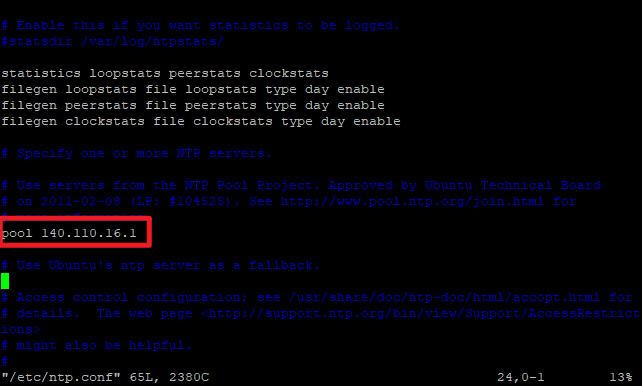
- Step 4. Enter the following command to modify the configuration file ➡️ and then type "i" to enter edit mode, you will see the following screen:
sudo vim /etc/ntp.conf
➡️ Type "#" in front of the content in the red box below to hide a default data.
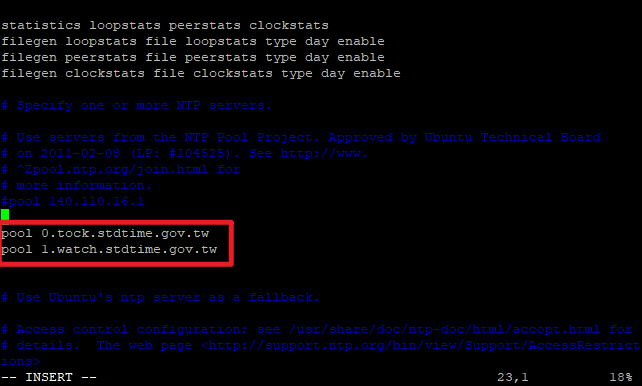
➡️ Enter the external NTP server in the same format as below ➡️ press the "esc" key to exit edit mode when finished ➡️ enter ":wq!" to save the file and leave
- Step 5. Enter the following command to restart NTP to update the settings.
sudo systemctl restart ntp
Ubuntu VCS instances (16.04 version)
-
Step 1. Connect to the VCS instance.
-
Step 2. Enter the following command to install the NTP package.
sudo apt-cache policy ntp
sudo apt install -y ntp=1:4.2.8p4+dfsg-3ubuntu5
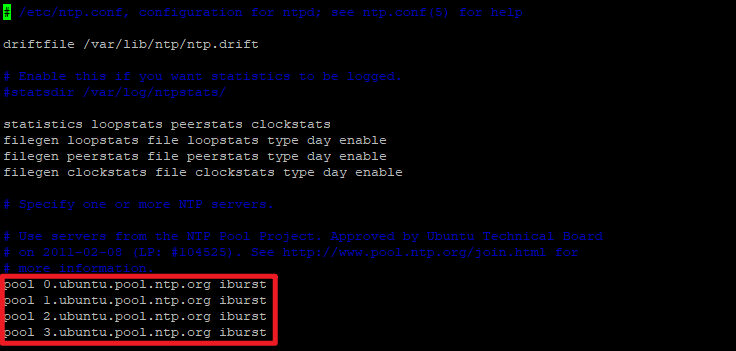
- Step 3. Enter the following command to modify the configuration file ➡️ and then type "i" to enter edit mode, you will see the following screen:
sudo vim /etc/ntp.conf
➡️ Type "#" in front of the content in the red box below to hide four default data.
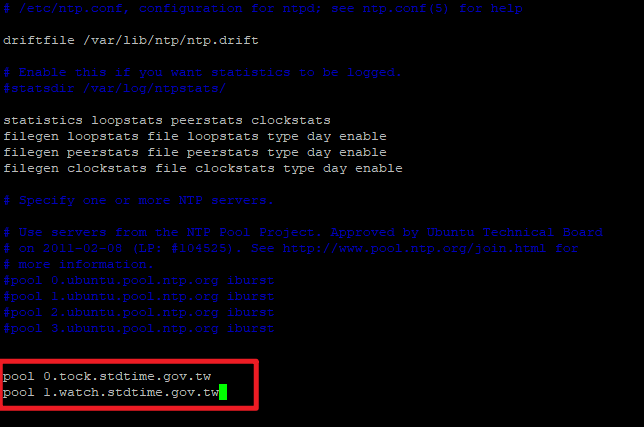
➡️ Enter the external NTP server in the same format as below ➡️ press the "esc" key to exit edit mode when finished ➡️ enter ":wq!" to save the file and leave
- Step 4. Enter the following command to restart NTP to update the settings.
sudo systemctl restart ntp